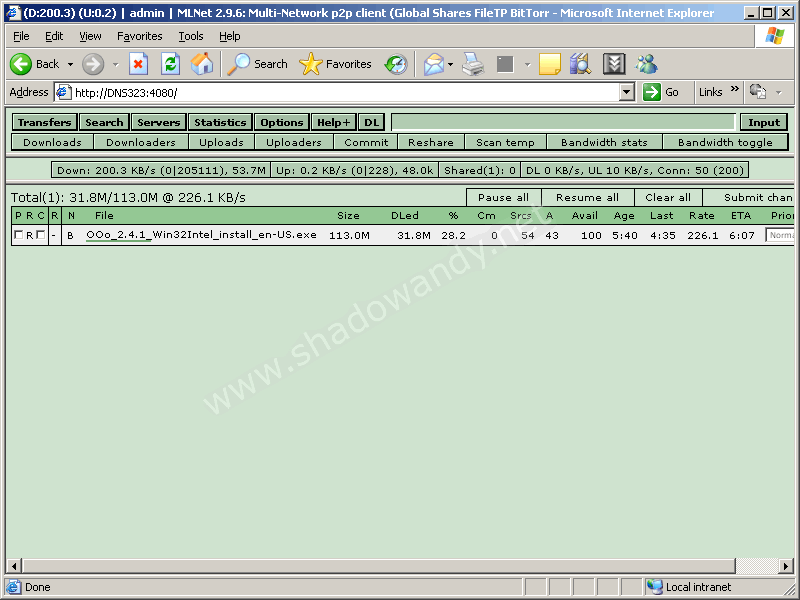
MLDonkey 2.9.6


    August 20th, 2008 | Tags: , , ,

    MLDonkey releases will now be packaged for fonz’s fun_plug (0.5) to ease the installation process. 3 variants of the compilation would be made available:

    1. mldonkey lite - supports filetp, bittorrent
    2. mldonkey normal - supports filetp, bittorrent, edonkey
    3. mldonkey full - supports filetp, bittorrent, edonkey, directconnect, fasttrack

    Installation

    Download the necessary package and place it on Volume_1 of your NAS (DNS-343, DNS-323, DNS-313). Telnet to your NAS and type the following commands

    / # cd /mnt/HD_a2
    /mnt/HD_a2 # funpkg -i mldonkey-2.9.6-lite.tgz
    Installing package mldonkey-2.9.6-lite …

    Running mldonkey

    To run mldonkey, simply issue the command “/ffp/start/mlnet.sh start”.

    /mnt/HD_a2 # /ffp/start/mlnet.sh start
    Starting mlnet

    MLDonkey takes some time to setup the necessary files. Default download directory has been set to “/mnt/HD_a2/mldonkey” or simple the mldonkey folder in Volume_1.

    To make MLDonkey auto-run on reboot, simply issue the following command

    /mnt/HD_a2 # chmod a+x /ffp/start/mlnet.sh

    Configuring MLDonkey if you are running it for the first time

    You would need to configure the settings so you can access the web interface. Execute the following commands.

    /mnt/HD_a2 # telnet 127.0.0.1 4000
    Welcome to MLDonkey 2.9.6
    Welcome on mldonkey command-line
    Use ? for help
    > auth admin “”
    Full access enabled
    SECURITY WARNING: user admin has an empty password, use command: useradd admin password
    > set allowed_ips “127.0.0.1 255.255.255.255″
    option allowed_ips value changed
    > save
    options and sources saved
    MLdonkey command-line:
    > exit
    Connection closed by foreign host

    Accessing the web interface

    After configuring the settings, you can direct your web browser to http://<NAS’s IP>:4080.

    Do leave your comments at MLDonkey for DNS-323

    Like to buy shadowandy a cup of Starbucks?

    FAQ

    The FAQ for setting up MLDonkey can be found here.


    Share it on del.icio.us


    65 responses

    1. Thanks shadowandy!
      That’s really easy to install!

       
    2. Thank you

       
    3. Glad that it is working for you all! :)

       
    4. Thanks for this. But is there a way of reversing the installation process of both this and funplug? I’m using a DNS 313 btw.

       
    5. to remove this package, simply type funpkg -r mldonkey-2.9.6-.

      To remove fun_plug, simply remove fun_plug and ffp folder.

      I guess you can’t get the ffp to work as you need to change the volume to HD_a4 instead.

       
    6. When I attempt to telnet into mldonkey after installing, i get a connection refused error. I tried the walkthru of the segmentation fault problem. But its still no working. What am I doing wrong?

       
    7. livid,

      try the following command and paste me the results

      ps | grep “./bt”

       
    8. Hi,

      had mldonkey-2.9.5 installed previously. I had some problems with the rights:
      * I had mldonkey running as root => chown -R nobody mldonkey
      * the directories didn’t have the x flag set =>
      ** chmod a+x searches
      ** chmod a+x incoming
      ** chmod a+x torrent
      ** chmod a+x shared
      ** chmod a+x temp
      * The ini files aren’t writeable (bug?). changed permissions to 777, still the same. (See the log)

      Hope this helps some ppl.

      Cheers Andi

      P.S.: The log.
      2008/08/26 09:10:40 [Opt] exception rename failed on downloads.ini: Permission denied while saving downloads.ini
      2008/08/26 09:10:40 [Opt] exception rename failed on users.ini: Permission denied while saving users.ini
      2008/08/26 09:10:41 [Opt] exception rename failed on stats_bt.ini: Permission denied while saving stats_bt.ini
      2008/08/26 09:11:03 [Opt] exception rename failed on files.ini: Permission denied while saving files.ini
      2008/08/26 09:11:03 [Opt] exception rename failed on searches.ini: Permission denied while saving searches.ini
      2008/08/26 09:11:03 [Opt] exception rename failed on friends.ini: Permission denied while saving friends.ini
      2008/08/26 09:11:03 [Opt] exception rename failed on servers.ini: Permission denied while saving servers.ini
      2008/08/26 09:11:03 [cCO] Options correctly saved
      2008/08/26 09:11:03 [Opt] exception rename failed on shared_files.ini: Permission denied while saving shared_files.ini

       
    9. Hi,

      I downloaded windows version of mldonkey installation package. When i run the mlnet.exe i get this error;
      —————————–
      2008/08/27 15:56:18 [cO] Starting MLDonkey 2.9.6 …
      2008/08/27 15:56:18 [cO] Language TR, locale CP1254, ulimit for open files 1024
      2008/08/27 15:56:18 [cO] MLDonkey is working in .

      2008/08/27 15:56:18 [cO] creating new MLDonkey base directory in .

      2008/08/27 15:56:18 [Gettext] Loading language resource mlnet_strings.TR_CP1254
      2008/08/27 15:56:18 [cO] loaded language resource file
      2008/08/27 15:56:18 [DNS] Resolving [depo] …
      2008/08/27 15:56:18 [DNS] Resolving [www.mldonkey.org] …
      2008/08/27 15:56:18 [dMain] Libmagic file-type recognition database present
      2008/08/27 15:56:18 [cInt] WARNING: Directory C:\mlDonkey is full, MLDonkey shut
      s down

      2008/08/27 15:56:18 WARNING: Directory C:\mlDonkey is full, MLDonkey shuts down
      —————————–
      what can i do?

      my os is windows 2003 standart edition r2

       
    10. Wow, I did it. Start to explore it more….
      Thanks.

       
    11. RammsteinTR,

      Perhaps your C:\ is out is space?

      Thai Ngo,

      Congrats! Do explore MLDonkey and share your experience.

       
    12. I realized that MLDonkey couldn’t work with BT. After installing BT then BT controls the port and I can’t access port 4080 anymore.
      So after removing BT and reinstall MLDonkey then it works.

       
    13. Thai Ngo,

      Yes. The BT on DNS-323 uses default port 6881 which is needed by MLDonkey also.

       
    14. @Andi,
      i’ve tried to fix owner:group to all the files in the mldonkey dir and to the dir itself, nothing changed, new .ini.tmp files with a copy of the config are recreated every time mlnet is started (reverting to 2.9.5 doesn’t solve the issue!).
      For a workaround, do the following:
      -rename mldonkey dir
      -install the mldonkey 2.9.6 package
      -start mldonkey (a new mldonkey dir is created)
      -copy the old .ini files to the new mldonkey dir

       
    15. thanks!
      what about GD support?

       
    16. Hi!

      I run the ch3snas and tried several mldonkey installations now, but it always ends with the same error:

      2008/09/15 00:25:23 [cInt] WARNING: Directory /home/root/.mldonkey is full, MLDonkey shuts down

      2008/09/15 00:25:23 WARNING: Directory /home/root/.mldonkey is full, MLDonkey shuts down

      I know that this means that mldonkey tries to run on the internal RAM disk instead of the HDDs..but I didn’t find out a way to correct this yet since, as far as i can see, the correct path has to be specified somewhere in the mlnet bin which I cannot edit. any ideas? =)

       
    17. vipEr,

      Did you use mlnet.sh?

       
    18. ryan,

      Will compile one with GD support soon. :)

       
    19. oh,

      Nice trick! Thanks for the instructions to upgrade current installations!

       
    20. hi shadowandy,

      Yes I did use the mlnet.sh … I even tried some “enhanced” scripts, always the same result. the funny thing is that the mnlet.sh does indeed create the mldonkey dir on mnt/HD_a2/ but it won’t run. :\
      I’m really out of ideas.

       
    21. vipEr: most likely you did not start the mlnet.sh command with the “sh” or “./” prefix, or you did not add the “start” keyword afterwards. The command should read: “sh mlnet.sh start”, or “./mlnet.sh start”, otherwise the command shell might be trying to execute the script as “root” (especially if you are using bash instead of sh.

       
    22. I usually get the refuse after i shutdown the hard disk. I don’t know why. So i have to reinstall the mldonkey then the system runs again.
      When the problem occurs, i can’t telnet to 127.0.0.1 4000. It says that the connection is refused. When i browse it with IE, it also says that the connection is refused as well.
      Can anyone help me? Thanks.

       
    23. @reggie :

      THX!, u r my personal Hero =)
      that is exactly what was wrong, didn’t use the start after mlnet.sh …prolly because this wasn’t part of the procedure when I did another tutorial, so I didn’t do it here either ^^

       
    24. vipEr,

      Seems like a lot of people don’t bother to follow instructions and you happened to be one of them!

       
    25. kelf,

      Maybe I should bold the mlnet.sh part, as quite a fair bit of users who face problems don’t use the mlnet.sh.

       
    26. Have the same problem as livid.

      quote:
      When I attempt to telnet into mldonkey after installing, i get a connection refused error. I tried the walkthru of the segmentation fault problem. But its still no working. What am I doing wrong?

      I get “connection refused when trying to connect to 127.0.0.1.
      I have BT installed.

       
    27. I suppose BT uses the same port as mldonkey because as soon as I uninstalled BT the problem was gone!

       
    28. Linus,

      Yes. The port 6881 is used by the default BT so MLDonkey can’t start up.

       
    29. Shadowandy,
      I still having problems with mldonkey.

      Current setup:
      DNS-323 (Static IP:192.168.1.99) connected to my router.
      iMac (Static IP: 192.168.1.65) connected to my router.

      MLDonkey is installed but when I try to start downloading a torrentfile using “dllink XYZ.torrent” nothing shows up in the web interface.

      I understand that it’s pretty hard for you to be able to help me but I’m totaly new to linux so I’m really having a hard time trying to get this up and running :)

       
    30. Linus,

      Make sure the torrent file is located in the correct directory. Perhaps you might wish to point it to a web address where the torrent file is located.

       
    31. I’ve tried 3 different torrent sites without any luck.
      But when I tried to download a torrent directly from piratebay it worked fine.

      Problems because of passkeys and such?

      Another question:
      I’ve search alot for a tutorial how to uninstall mldonkey but couldn’t find any. :)

       
    32. Linus,

      To remove any package on fonz’s fun_plug, use the funpkg -r command

       
    33. Dear all,

      Due to the large amount of repeated questions. I’ve compiled the common problems into an FAQ.

      Check out the MLDonkey FAQ

       
    34. I try to set BT-max_bt_uploaders to value greater than 5 (default is 3) and it forces back to 3. I found that I can’t set value lower than 1 and higher than 5. In that case I was reset to default 3. How to rise this setting. I need minimum 15. I’ve experimented with lots of settings, but with no success. My max_upload_slots set to 30. What it may be the problem? Thank you in advance for any ideas.

       
    35. hi i encounter “permission denied” on

      /mnt/HD_a2 # funpkg -i mldonkey-2.9.6-lite.tgz

      any idea how to carry on?

      thanks.

       
    36. /mnt/HD_a2 # chmod a+x mldonkey-2.9.6-lite.tgz
      did you try this ?

       
    37. Please, shadowandy,

      Help with BT-max_bt_uploaders issue. Ive searched everything I could, but nothing found. It seems that this issue is DNS-323 specific.

       
    38. alpha,

      I’ve tried mldonkey 2.9.6 for other operating systems (particularly for windows) and found out that BT-max_bt_uploaders cannot be set to a value greater than 5 as well. If you can, do try out mldonkey 2.9.6 for other operating systems and try to set BT-max_bt_uploaders to a value greater than 5. Do tell me if you have success doing so.

      The issue is not specific to DNS-323.

       
    39. Hi Shadowandy,

      First off, thanks for the great step-by-step guide on MLDONKEY. Was previously using the default BT client on my DNS-323.

      So far everything’s good, though i’d never gotten DL speed above 20KBps.

      Anyhow a strange problem i have had since day one was after sometime, the UL and DL will stay at 0.0 ie not uploading or downloading anything. Is there something wrong with my setting? Or is it BTJUNKIE putting a limit to my UL and DL?

      To overcome this problem, i’ve to shutdown the DNS-323, wait for about 1min before restarting the DNS and mlnet.sh.

      It’s rather annoying to find out in the morning that the DNS was on the whole night w/o DL anything. Any advice would be appreciated. Thanks :)

       
    40. Thanks shadowandy for quick answer. I do not have any chance to try it on other operating system than windows, but if this is not specific to DNS-323 we can try to ask at mldonkey’s official forum. I’ve searched it, but it seems that no one has this issue (no threads about this). I’ll try to register here and ask. Thanks again.

       
    41. look at this http://mldonkey.sourceforge.net/forums/viewtopic.php?p=28874#28874
      It seems like general issue and still not solved

       
    42. Look at this.
      http://mldonkey.sourceforge.net/forums/viewtopic.php?p=28874#28874
      It seems, that everyone has issue with 2.9.6 version of MLDonkey and still there is no solution.

       
    43. alpha,

      I see. Hope there would be a patch released soon!

       
    44. Sorry for posting twice…. :(

       
    45. alpha,

      It is alright. :)

      Let’s hope for a bug fix!

       
    46. i got a error when i run the command. where can i get getopt?

      # ./funpkg -i /mnt/HD_a2/mldonkey-2.9.6-lite.tgz
      ./funpkg: line 222: getopt: not found

       
    47. ehel,

      You don’t need a ./ before the funpkg and run funpkg at the directory where the tgz file is located. Try to follow the instructions in the guide.

       
    48. Hi shadowandy,
      I’m now using SSH on my DNS-323, and decided to install mldonkey. I ask your help for the step “Configuring MLDonkey if you are running it for the first time”, once I dont have telnet enabled anymore. How can I do that on SSH with root user? I thank you in advance.

       
    49. gmpassos,

      You will still be able to telnet

       
    50. hi, is there any way to boost the MLDonkey? I’m using version 2.9.6, but I just can connect to max = 3 servers (even i changed the setting for max server connection to 10 already).
      Besides, download rate is just about 1kb/s. Sometimes it can be 10+kb/s but most of the time it’s about 1 - 5kb/s.
      I don’t know how I can boost it, maybe more server may help. But I don’t know how I can connect to more servers.
      Your help is much appreciated. Thanks.

       
    51. Thai Ngo,

      For peer to peer applications, it really depends a lot on the seeders. On private sites I can pretty much hit the max of my adsl line.

       
    52. Hi,

      >I usually get the refuse after i shutdown the hard disk. I don’t know >why. So i have to reinstall the mldonkey then the system runs again.
      >When the problem occurs, i can’t telnet to 127.0.0.1 4000. It says that >the connection is refused. When i browse it with IE, it also says that the >connection is refused as well.
      >Can anyone help me? Thanks.

      i have this problem too.

      PS i use dns313 that is why i havent BT.
      PS 2 i use full version and directconnect only.

       
    53. ok it was my mistake. now i can connect to my hub. but i have other problem - i cant search and other people cant get my filelist.
      I have router - i think i must configure it.
      shadowandy, can u help me with it?

       
    54. spycam,

      You have to refer to your router’s manual to open a port.

       
    55. shadowandy, please look at my options in MLNET and router
      http://img84.imageshack.us/my.php?image=option1qn4.jpg
      http://img230.imageshack.us/my.php?image=option2jc3.jpg
      http://img230.imageshack.us/my.php?image=option3ya6.jpg

      but i cant search and other people cant get my filelist
      What is wrong?

       
    56. Hi Shadowplay,

      I’m getting the connection refused too and I get from what I read here that maybe BT is the responsible for this. Is it? I should uninstall it? How do i do it? I’m the newbiest of the newbies on this (linux included).

      I did the command you asked Livid and got this:

      / # ps | grep ../bt.
      1393 root ./btdog ./bt –daemon-loop
      1394 root ./bt –daemon-loop
      1398 root ./bt –daemon-loop
      1399 root ./bt –daemon-loop
      1400 root ./bt –daemon-loop
      1401 root ./bt –daemon-loop
      1402 root ./bt –daemon-loop
      22982 root grep ../bt.

      Thanks fot the help!

      Daniel

      PS: I did all the installation steps, like a good newbie :)

       
    57. Ive installed MLD and it was running before but after some reboots on the NAS i tried to enter my webaccess and could’nt get in.

      Now i noticed that mlnet.sh was not running and when i check status after i started mlnet.sh i get the following message:
      /ffp/start/mlnet.sh: line 39: mlnet_status: not found

      trying to telnet 127.0.0.1 4000 i get the following message:
      telnet: cannot connect to remote host (127.0.0.1): Connection refused

      Anyone know what to do? I tried reinstalling. Only made changes with nzbget package.

       
    58. Daniel,

      Do uninstall the default BT. :)

       
    59. Seppie,

      Do check if mlnet is running by doing a ps

       
    60. Okdok Shadow! I just need to find out how to do it…

      Thanks!

       
    61. Found a broken link at http://www.shadowandy.net/2007/05/mldonkey-for-dns-323.htm

      There is a link in the table at the end “2.9.6: blog entry and download (*compiled for ffp 0.5)” which should point to http://www.shadowandy.net/2008/08/mldonkey-296.htm but not.

       
    62. [...] blog entry and download (*compiled for ffp [...]

       
    63. Shadow,
      Sorry about bugging you again, but I can´t manage to delete the mnt/Nas_prog/BT folder in order to uninstall BT. I tried the chmod thing to give me access to the folder but it didn´t work. Do you have a tutorial somewhere?

      Thanks!

      Daniel

       
    64. [...] Finally found some time to do the patch and compiling the new binaries for DNS-313/DNS-323/DNS-343. Again these archives are for those boxes running on fonz’s fun_plug 0.5. Installation instructions are similar to MLDonkey 2.9.6. [...]

       
    65. Hi, I have a problem that the MLDonkey can’t start after i restart the router without turning off the DNS 323.
      I’ve got this problem many times. Does anyone know how to fix this problem? Thanks.


    Leave a reply


    Send a trackback.


    RSS Feeds


    Treat shadowandy!


    Like to treat shadowandy a cup of Starbucks?

    Polls


    Which is your preferred SOHO networking brand?

    • D-Link (48%, 225 Votes)
    • Linksys (27%, 126 Votes)
    • Cisco (12%, 57 Votes)
    • Netgear (7%, 34 Votes)
    • Buffalo (2%, 9 Votes)
    • TRENDnet (1%, 6 Votes)
    • PCI (1%, 5 Votes)
    • Planex (1%, 3 Votes)

    Total Voters: 465

    Loading ... Loading ...


    Recent Comments


    Friend's Blog


    Interesting Links


    Previous Postings


    Copyright © 2005 - 2008 www.shadowandy.net  69 queries. 0.741 seconds.Go back up ↑