D-Link DNS-320 – Layman speed test (25)


    November 25th, 2010 | Tags: , ,

    The D-Link DNS-320 outperforms the D-Link DNS-323 in terms of network throughput  for read/write tests.

    As promised, I will conduct a network throughput test for the DNS-320. What I have done is the layman method of testing network throughput – load the hard disks in, monitor the bandwidth usage while transferring files over network. In this test, I will be transferring vmdk files (VMWare disk files).

    I will be testing DNS-320′s network throughput when the disks are set to Single, RAID0 and RAID1.

    Equipments used

    1. DIR-855 for its Gigabit network ports
    2. D-Link DNS-320 (firmware 1.00)
    3. Two units of Samsung 2TB F4 drives
    4. Trusty computer with Gigabit network port

    DNS-320′s network throughput when disks are in Standard mode


    Upload speed of 217.3Mbps in Standard mode


    Download speed of 270.2Mbps in Standard mode

    DNS-320′s network throughput when disks are in RAID0 configuration


    Upload speed of 213.4Mbps in RAID0 configuration
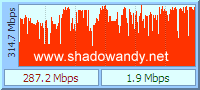

    Download speed of 287.2Mbps in RAID0 configuration

    DNS-320′s network throughput when disks are in RAID1 configuration


    Upload speed of 204.7Mbps in RAID1 configuration


    Download speed of 266.4Mbps in RAID1 configuration

    Conclusion of DNS-320 speed test

    For an affordable device like the DNS-320, I couldn’t ask for better network throughput. On the average, I could upload files at a speed of approximately 210Mbps to the DNS-320 and download comfortably at 270Mbps.

    However, I suspect my trusty computer might be the bottleneck for the download test as the difference in speed for single and RAID0 configuration is too marginal. Usually there will be a stark difference in download speed between standard and RAID0. Probably need a re-run after doing a few more tests.

    The DNS-320 clearly outperforms the DNS-323. The DNS-323 manages about 138.38mbps and 154.62mbps for upload and download respectively in the previous test.

    Getting a DNS-320?

    Check out D-Link Systems ShareCenter 2-Bay USB 2.0 External Hard Drive Enclosure DNS-320 Black deals on Amazon.com


    25 responses

    1. Any detail specs of DNS-320 such as ram and processor? funplug coming up soon?

      Waiting for your results =)

       
    2. @wenwei, processor is 800Mhz and RAM is 128MB. As for funplug, existing version work for this NAS with slight modification. Hope this help.

      Source: http://wiki.dns323.info/dns-320

       
    3. Albert,

      Will you be picking up a DNS-320? Seems like a worthy investment.

       
    4. Funplug can be supported by edit the fun_plug to rename /mnt/HD_a2 into /mnt/HD/HD_a2

      im running fun plug now.

      very satisfied

       
    5. LOL.

      Yes Andy, I hoot one today, now need to look for spare HDD. ;)

       
    6. Just got my DNS-320 as well. Maybe i am imagining it – but the network throughput seems slow. Have been tinkering with both my DIR-655 och the DNS-320, without finding any obvious bottlenecks.

      What software did you use for your read/write test?

       
    7. Daniel,

      I am using DUmeter to measure the transfer rate.

       
    8. Thanks,
      I’ll give it a try :)

       
    9. How come the result is so fast, it’s more than 4 times faster than the hdd read speed.

       
    10. Lee,

      I am measuring the speed in bits and not bytes. :)

       
    11. Have D-Link upgraded the Linux kernel in the 320 vs. 323?

       
    12. Jamie,

      The DNS-320 I have is on Linux version 2.6.22.18.

      The DNS-323 is on Linux version 2.6.12.6-arm1

       
    13. Seems odd that D-Link would use a Kernel that’s 3 years old on a new product? We’re up to 2.6.36.2 now!

       
    14. Jamie,

      Beats me. But I rather go for stability than be at the forefront of technology.

       
    15. This NAS is sounding good, but will it work with Squeezebox / SqueezeCenter?

       
    16. Is it compatible with Advanced Format 4K sector drives?

       
    17. Hi,

      I have the exact same setup (DNS-320 and two units of Samsung 2TB F4 drives) but the throughput I get using a DIR-655 gigabit router is at a best 50 Mbps.

      Did you update the HDDs firmware to fix the known bug (http://www.samsung.com/global/business/hdd/faqView.do?b2b_bbs_msg_id=386)?

      Did you do any alignment formatting of the disks due to AFT issues with NAS?

      Glad for any feedback, not happy with the performance of my NAS.
      Thanks.

       
    18. Jonas,

      The results of the speed test depends on both the source and destination – the computer involved in the test and DNS-320.

      Of course, there might be other factors involved like the type of ethernet cable used, length of the network cable, etc.

      I recently updated the firmware and did the alignment from start. Honestly speaking, I didn’t see much difference between not updating and updating firmware.

      Perhaps you can share a bit on your setup?

       
    19. Hi,

      I’ve updated the FW and I’ll try to align the disks and make some more testing.

      You’re providing great information.

      cheers,
      Jonas

       
    20. Any idea if upgrading from DNS-321 will be straight-forward? Can we just move the disks from 321 to 320?

       
    21. With 2.0 firmware, it will align the disks.
      Tested with WD Green 15EARS

       
    22. HI,
      are those results from DU meter are the network speeds not the I/O write speeds right? So, does that mean when you have a download/upload speed of around 1 MB/S you are only downloading around 10KB/s actual I/O speed. So you result of 200 MB/s mean around 2 MB/S of actual file right? That’s what i am getting when I am trying to copy files about 8mins for 1GB file. Or Am I completely wrong here?

       
    23. AK,

      My speed are the transfer speed between the computer and test subject, DNS-320.

      The speeds are in bits per second, so if I clocked 287.2Mbps in the download test, it is translated to 35.9 megabytes per second (287.2 / 8). This is not equivalent to disk I/O speed as the test did not highlight whether this is due to network interface hardware limitation or disk interface hardware limitation.

      It is simply a test of the amount of data that has been pushed out onto the network interface.

       
    24. [...] For a more technical review, check out my friend, shadowandy, blog post entitled D-Link DNS-320 – Layman speed test. [...]

       
    25. [...] DNS-320 network performance refer to the followings: D-Link DNS-320 – Layman speed test | shadowandy – my life stories Transfer rate and Networkperformance of the D-Link [...]


    Leave a reply


    Send a trackback.

    Comments will be sent to the moderation queue.


    Advertisements


    Treat shadowandy!


    Like to treat shadowandy a cup of Starbucks?

    Recent Comments


    Friend's Blog


    Interesting Links


    Previous Postings


    Copyright © 2005 - 2012 www.shadowandy.net  121 queries. 0.750 seconds.Go back up ↑